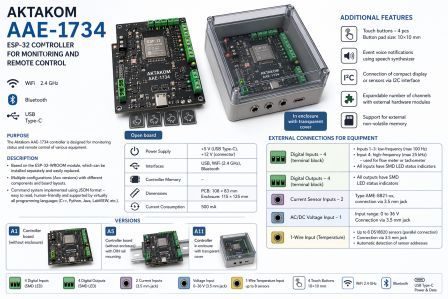
AAE-1734 Remote Controller
AAE-1734 Remote Controller
Click an image to enlarge
Brand: Learn more...
Command BLINK MODESet the blinking mode
Status Active
Command description Parameters BLINK MODE=blink_mode ARRAY=x;x;xResponse Examples BLINK MODE=SINGLE ARRAY=2;3;10Compatible devices AAE-1734, AAE-1738Can be used for reading
Command BSTA CEL=<NC>Launch the Telegram bot
Status
Command description Launch a Telegram bot.Parameters CEL-the cell number of the bot that needs to be launched.Response Examples Compatible devices AAE-1734, AAE-1738Can be used for reading
Command CMDLISTStatus Active
Command description Parameters CMDLIST DEL ID=<TASK_ID>Response Examples Compatible devices AAE-1734, AAE-1738Can be used for reading Yes
Command HWCFGRequest device configuration
Status Active
Command description Device hardware configuration request-responseParameters ?Response {"Name":"AAE-1734","SN":"352501","Version":"1.0.0.0","Date":"2025-02-05 14:00:05.001","Interfaces":["BT","WiFi",{"ID":"USB","Spec":"VCOM","Baud":9600}],"Memories":[{"ID":"SPI","Access":"RW","Size":8388608},{"ID":"ROM","Access":"R","Size":2040109465}],"Inputs":[{"ID":"In1","Type":"Input","DataType":"Bool","SampleRate":10},{"ID":"In2","Type":"Input","DataType":"Bool","SampleRate":10},{"ID":"In3","Type":"Input","DataType":"Bool","SampleRate":10},{"ID":"In4","Type":"Input","DataType":"Bool","SampleRate":10},{"ID":"ADC1","Type":"Input","DataType":"Float","Min":0,"Max":1,"Unit":"V"},{"ID":"ADC2","Type":"Input","DataType":"Float","Min":0,"Max":1,"Unit":"V"},{"ID":"ADC3","Type":"Input","DataType":"Float","Min":0,"Max":36,"Unit":"V"},{"ID":"ADC4","Type":"Input","DataType":"Float","Min":0,"Max":36,"Unit":"V"},{"ID":"Thermo1","Type":"Input","DataType":"Float","Min":-55,"Max":125,"Inc":0.05},{"ID":"Thermo2","Type":"Input","DataType":"Float","Min":-55,"Max":125,"Inc":0.05},{"ID":"Thermo3","Type":"Input","DataType":"Float","Min":-55,"Max":125,"Inc":0.05},{"ID":"Thermo4","Type":"Input","DataType":"Float","Min":-55,"Max":125,"Inc":0.05},{"ID":"Thermo5","Type":"Input","DataType":"Float","Min":-55,"Max":125,"Inc":0.05},{"ID":"Thermo6","Type":"Input","DataType":"Float","Min":-55,"Max":125,"Inc":0.05},{"ID":"Thermo7","Type":"Input","DataType":"Float","Min":-55,"Max":125,"Inc":0.05},{"ID":"Thermo8","Type":"Input","DataType":"Float","Min":-55,"Max":125,"Inc":0.05}],"Outputs":[{"ID":"Out1","Type":"Output","DataType":"Bool","SampleRate":10},{"ID":"Out2","Type":"Output","DataType":"Bool","SampleRate":10},{"ID":"Out3","Type":"Output","DataType":"Bool","SampleRate":10},{"ID":"Out4","Type":"Output","DataType":"Bool","SampleRate":10},{"ID":"Out5","Type":"Output","DataType":"Bool","SampleRate":10},{"ID":"Out6","Type":"Output","DataType":"Bool","SampleRate":10},{"ID":"Out7","Type":"Output","DataType":"Bool","SampleRate":10},{"ID":"Out8","Type":"Output","DataType":"Bool","SampleRate":10}]}1992Examples HWCFG?Compatible devices AAE-1734, AAE-1738Can be used for reading Yes
Command IDNRequest a device identifier
Status Active
Command description Requests the device for its identifier string.Parameters ? - option to indicate the reading mode, indicated at the end of the commandResponse Model #SerialNumberExamples Command:Compatible devices AAE-1734, AAE-1738Can be used for reading Yes
Command IDNDWrite or read device identifier
Status Under development
Command description The command writes or reads the name and SN of the device and the user name entry.Parameters ? (option to designate reading mode)Response Response when writing - repeating what was writtenExamples 1. IDND? (parameter Mode user- default)Compatible devices AAE-1734, AAE-1738Can be used for reading
Command IPARequest the device's IP address
Status Active
Command description Read IP addressParameters ?Response 192.168.50.139Examples IPA?Compatible devices AAE-1734, AAE-1738Can be used for reading Yes
Command description Parameters KEY OLD=old_key NEW=new_key,Response Didn't checkExamples Compatible devices AAE-1734Can be used for reading
Command LIBVERRequest a library version
Status Active
Command description Parameters No parametersResponse LIBVER? – returns the library version in the x.x.x.x format, where x is a number.Examples Compatible devices AAE-1734, AAE-1738Can be used for reading Yes
Command NAMEWrite or read WiFi network name
Status Active
Command description Specify the name of the WiFi network to connect to. This command writes this data to the device's EEPROM. The network name will be read the next time the device is powered on, meaning you must power cycle the device for this information to take effect.Parameters SSID (write)Response SSID (when reading)Examples NAME SSIDCompatible devices AAE-1734, AAE-1738Can be used for reading Yes
Command NOTIF (previously INTERRUPT)Interrupt message
Status Under development
Command description An interrupt message is sent to the program at the device's initiative, without a prior request for information.Parameters Response in JSON formatExamples - interrupts in JSON formatCompatible devices AAE-1734, AAE-1738Can be used for reading Yes
Command OUTP CH=x VAL=yStatus Active
Command description Parameters CH= x, where x is the channel number starting with 1Response [2025-06-19 15:04:21.341]: OUTP CH=2 VAL=0Examples [2025-06-19 15:04:21.337]: OUTP CH=2 VAL=0Compatible devices AAE-1734, AAE-1738Can be used for reading Yes
Command OUTP CH=x?Status Active
Command description Parameters x - channel numberResponse The answer depends on the request parameters.Examples [2025-06-19 15:04:26.305]: OUTP CH=ALL?Compatible devices AAE-1734, AAE-1738Can be used for reading Yes
Command OUTP?Status Active
Command description Parameters No parametersResponse HH is the hexadecimal code for the output status. The most significant digit is the most significant output (8th), the least significant digit is the least significant output (1st).Examples [2025-06-19 15:25:08.256]: OUTP?Compatible devices AAE-1734, AAE-1738Can be used for reading Yes
Command PASSWriting or reading a network password
Status Active
Command description Specify the password for the network you want to connect to. The network password will be retrieved the next time the device is turned on, meaning you must power cycle the device for the password to take effect.Parameters password (for writing)Response password (when reading)Examples PASS passwordCompatible devices AAE-1734, AAE-1738Can be used for reading Yes
Command THERMO?Read data from all connected temperature sensors
Status Active
Command description Command to read all temperature sensors connected via a single-wire interfaceParameters No parametersResponse {"TimeStamp":"2025-2-27 11:38:16.615","Sensors":[{"Model":"DS18B20","Type":"Thermo","Address":"402065632105196243106","Min":-55,"Max":125,"Accu":0.5,"Resolution":12,"Power Mode":"External","Temperature":25.875},{"Model":"DS18B20","Type":"Thermo","Address":"401971581571422699148","Min":-55,"Max":125,"Accu":0.5,"Resolution":12,"Power Mode":"External","Temperature":25.1875},{"Model":"DS18B20","Type":"Thermo","Address":"401352815114883105","Min":-55,"Max":125,"Accu":0.5,"Resolution":12,"Power Mode":"External","Temperature":24.4375}]}Examples THERMO?Compatible devices AAE-1734, AAE-1738Can be used for reading Yes
Command THERMODIAG?Temperature request
Status Active
Command description Parameters No parametersResponse Temperature value in a form convenient for perception.Examples Compatible devices AAE-1734, AAE-1738Can be used for reading Yes
Command TIME?Query the current time
Status Active
Command description Returns the time in the format: day_of_week, month_dd_yyyy_hh:mm:ss.Parameters ?Response 2025-3-5T19:49:25+251Examples TIME?Compatible devices AAE-1734, AAE-1738Can be used for reading Yes
Command UTCNSet or read time zone
Status Active
Command description Set the UTC time zone offset, where XX is the offset. The offset can be either a positive or negative number.Parameters XX (XX is the offset. The offset can be represented as either a positive or negative number.)Response -5Examples UTCN -4Compatible devices AAE-1734, AAE-1738Can be used for reading Yes
Command VOLTRead the voltage value
Status Under development
Command description The VOLT CH=1? read command returns the voltage value.Parameters CH=<channel_number>|ALL?Response Response:Examples VOLT CH=1?Compatible devices AAE-1734, AAE-1738Can be used for reading Yes
Command WIFISet Wi-Fi network parameters
Status Active
Command description Set Wi-Fi network connection settings.Parameters WIFI NAME=ssid PASS=password,Response Examples The specified values are not read by the new ones, but the old ones are read by NAME PASSCompatible devices AAE-1734Can be used for reading
The Aktakom AAE-1734 is a compact, versatile controller designed for monitoring and remote control of a wide range of equipment. Built around the reliable ESP-32-WROOM module, it combines wireless connectivity, flexible I/O options, and modular expandability, making it suitable for industrial automation, smart systems, and custom control applications. At its core, the controller supports WiFi (2.4 GHz), Bluetooth, and USB connectivity, enabling seamless integration with PCs, cloud platforms, and IoT environments.
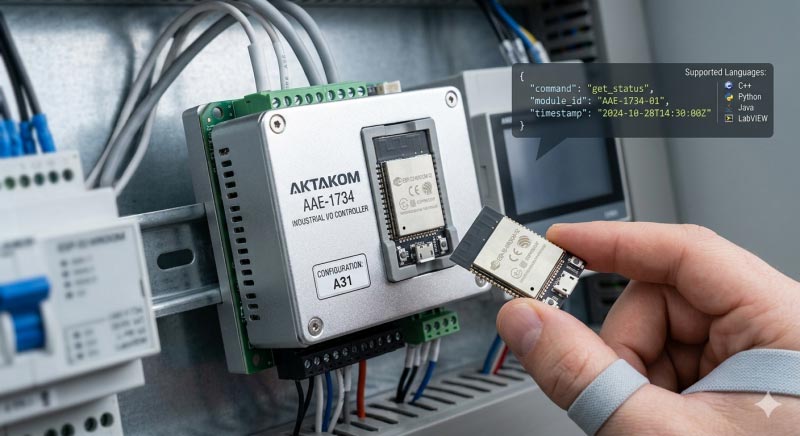
Its command structure is based on JSON , which simplifies communication and allows easy implementation across popular programming languages such as C++, Python, Java, and LabVIEW.
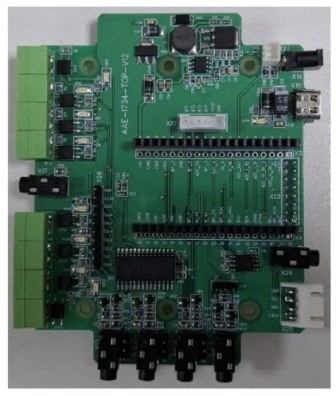
The AAE-1734 offers a robust set of input and output interfaces. It includes four digital inputs and four digital outputs, all with LED status indication. Three inputs are optimized for low-frequency signals, while the fourth can handle high-frequency signals up to 25 kHz, making it ideal for applications such as flow measurement or tachometry. Additional inputs allow connection of current sensors, AC/DC voltage measurement (0–36 V), and up to eight DS18B20 temperature sensors via a 1-Wire interface, with automatic device detection.
Beyond standard I/O, the controller features four touch buttons, support for voice event notifications via a speech synthesizer, and expansion capabilities throughI2C-connected displays or sensors.
It also supports external non-volatile memory and can be extended with additional hardware modules to increase channel capacity.
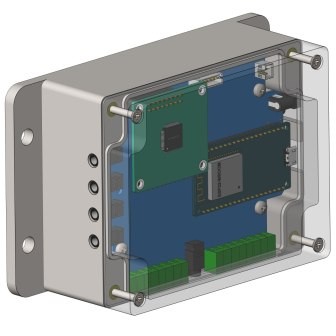
Physically, the controller is available in multiple configurations: as a standalone PCB, a DIN rail–mountable version, or a fully enclosed unit with a transparent cover. Powered via USB Type-C (5V) or 12V input, and with a modest consumption of around 500 mA, it is well-suited for both bench-top and field installations.
Overall, the Aktakom AAE-1734 stands out as a flexible, developer-friendly controller that bridges embedded hardware and modern IoT systems with ease.
The Aktakom AAE-1734 controller is based on a ready-made ESP-32-WROOM module, which can be installed separately and easily replaced.JSON format commands, which are easy to read and interpret by users and are supported by virtually all programming languages (C++, Python, Java, LabVIEW, etc.).
Specifications
Power Supply:
+5 V (USB Type-C connector), +12 V
Interfaces:
Controller Memory:
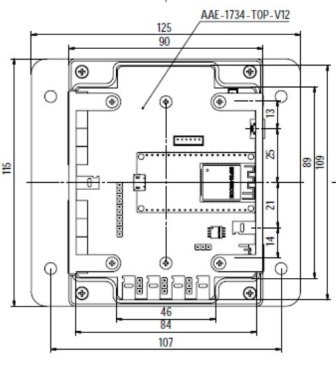
Dimensions:
Current Consumption:
External Connections for Equipment
Digital Inputs – 4 (terminal block connection):
Inputs 1–3 are low-frequency (max switching frequency: 100 Hz)
Input 4 can be configured as high-frequency (max switching frequency: 25 kHz)
Used for flow meter or tachometer functions
All digital inputs have SMD LED status indicators
Digital Outputs – 4 (terminal block connection):
All outputs have SMD LED status indicators
Current Sensor Inputs – 2AME-8821-xx , connection via 3.5 mm jack connector)
Voltage Measurement Input:
AC or DC measurement
Input range: 0 to 36 V
Connection via 3.5 mm jack connector
1-Wire Input:
Supports up to 8 temperature sensors (parallel connection)
Sensor type: DS18B20
Connection via 3.5 mm jack connector
Automatic detection of sensor addresses
Additional Features of the Aktakom AAE-1734
Touch buttons – 4 pcs (button pad size: 10 × 10 mm)
Event voice notifications using a speech synthesizer
Ability to connect a compact display or sensors via I2C interface
Expandable number of channels via external hardware modules
Support for external non-volatile memory
Versions
A1 – controller board (without enclosure)
A5 – controller board (without enclosure) with DIN rail mounting
A11 – controller in enclosure with transparent cover
Back to the section