| www.tmatlantic.com
Test & Soldering Equipment On-line Store |
|
D.E.V.I.C.E. (Wiki)Calculators Services |
|||||



LG Washer-Dryer Combo: When Real Tech Know-How Beats AI GuessworkOE FAULT / CD STATUS — TECHNICAL ANALYSIS & CORRECT PROCEDURE LG WM3455HM Washer Dryer Combo
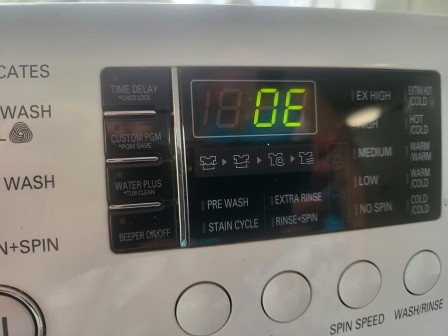
Pic 1 Error Code OE OE FAULT (DRAIN FAILURE) Nature of the Error: The machine cannot drain the water (or drains too slowly). Main Causes (in descending order of probability) 1. Pump filter blockage (most common cause) • Coins, lint, hair, debris • Water does not drain → OE error Pic 1
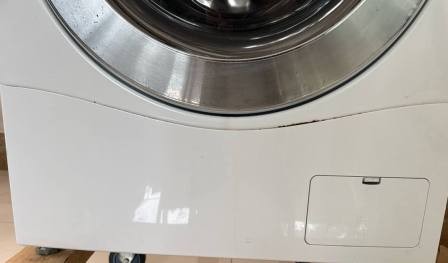
Check via the front lower access panel. 2. Kinked or clogged drain hose • Kinked behind the machine • Clogged with dirt or lint This often happens after moving the machine. 3. Pump (drain pump) issue • It hums but doesn't pump • Or it doesn't turn on at all Possible causes: • Stuck impeller • Worn-out pump 4. Sewerage blockage (Important!) • The drain pipe in the wall isn't draining properly • Water flows back into the machine This is especially common in older buildings. 5. Less common causes: • Control board error • Poor electrical contact in the pump wiring How to check quickly (step-by-step) 1. Open the lower access panel → unscrew the filter Be prepared—water will spill out 2. Clean the filter thoroughly 3. Check the hose at the back of the machine 4. Select the "Spin" cycle If you hear a hum → the pump is working If there is no sound → the pump needs replacement Typical symptoms • Water remains in the drum • The cycle stalls before the spin phase • Laundry remains wet • A humming sound is audible, but the water does not drain Practical insight (Important!) In 70–80% of cases, the problem is: A dirty filter or small debris inside the pump (Often: coins, paper clips, threads—the usual suspects) In short: OE = No proper water drainage Obviously, all the checks listed above have been performed to rule out minor debris obstructions. There is no humming sound from the drain pump, and water remains in the tank. Clearly, disassembly is required. ChatGPT offers two options: Option 1 (the correct one—"by the book") The entire front panel must be removed, not just the bottom cover. You noticed correctly: on LG units, that plastic bottom trim piece (the kick panel)Pic 2 does NOT provide access to the pump itself. It merely provides access to the filter. And for this specific model, this constitutes the first error: ChatGPT is unaware that the plastic lower trim piece is actually a large panel that conceals the lower section of the machine—including the two pumps.
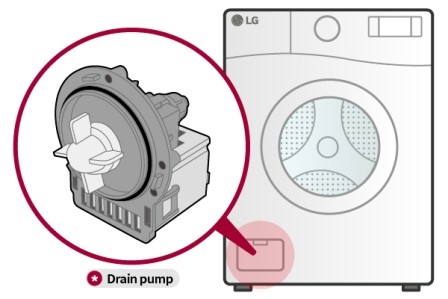
Pic 2 front Kick Panel And according to ChatGPT, the process proceeds as follows: To access the pump, there are two viable methods: ???? Option 1 (the correct method—"by the book") The entire front panel is removed, rather than just the lower cover. While technically correct, this step is not actually necessary for this specific model. —Furthermore, the photo shows the pump positioned on the left, whereas in reality, it is located on the right.
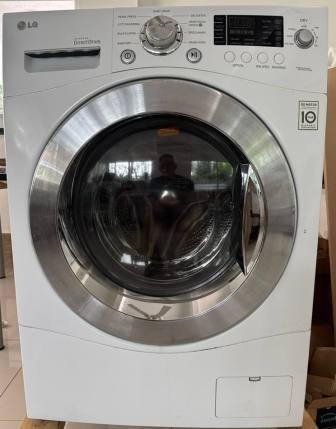
Pick 3 Kick Panel on the right In other words, ChatGPT simply mixed up the models. What it looks like (step-by-step)
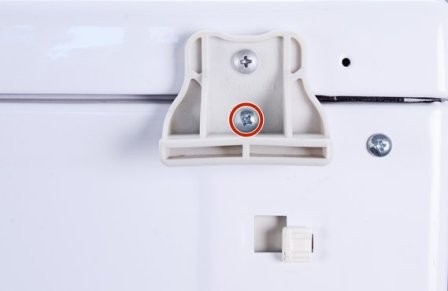
Pic 4 AI shows clearly wrong model Key Steps (highly simplified for an experienced technician): 1. Disconnect power and water 2. Remove the top cover 2 screws at the back → slide back → remove See pic 5
Pic 5 Back Panel 3. Remove the control panel: Pull out the detergent dispenser drawer. Unscrew the internal screws. Unclip the panel. 4. Open the door and: Remove the spring clamp securing the door seal. Tuck the seal inward.
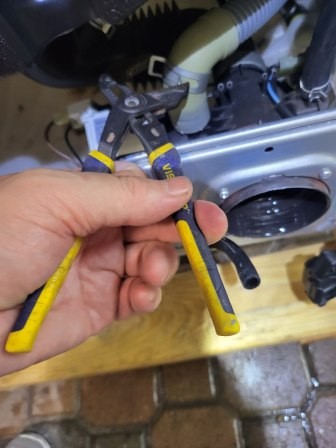
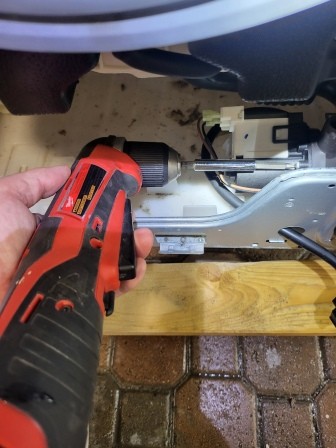
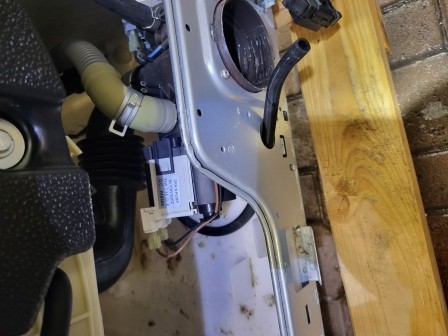
Pic 6 Spring Clamp 5. Unscrew: The door lock assembly. The lower trim panel (the one mentioned earlier). The screws located around the perimeter of the front panel. 6. Remove the entire front panel assembly. Once this is done, the pump will be directly in front of you (typically located at the bottom left). Remove the hose clamp. Removing the pump: unscrew the 3 screws—this is easiest using an angle drill—it's quick and simple.
Pic 7 Pump removal It is recommended to use the same method when tightening the screws after installing the new motor. Important (Common Breakage Points) • The rubber seal clamp is the trickiest part. • The front panel is held in place by clips → do not yank it; instead, gently pry it open. • There will always be a small amount of residual water inside. Option 2 (The Quick Method — likely how you've done it before) Simply tilt the machine backward. How to do it: 1. Shut off the water supply. 2. Drain the water through the filter. 3. Tilt the machine backward. 4. Unscrew the pump from underneath. This actually works—and it's faster. And herein lies ChatGPT's second error—see the photo—which clearly shows a full pallet.
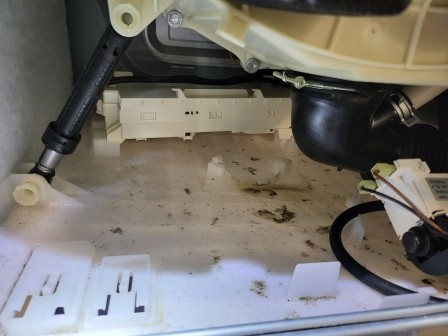
Pic 8 bottom of the machine Therefore, for this specific model, the alternative approach is to remove the large lower panel. However, there is a drawback—limited visibility—though, overall, the pump is quite accessible.
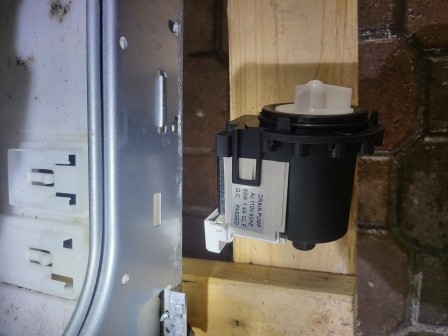
Pic 9 Access to pump The pump itself looks like this:
Pic 10 Pump Next, connection errors regarding the pump can occur—for example: "I replaced the pump with a different one, but the 'OE' error hasn't gone away. And if I run the short cycle—the 14-minute 'Spin and Drive' mode—it freezes at the 13-minute mark and just sits there. What would you recommend I do next?" Key symptoms: • 'OE' error code • Freezing at the 13-minute mark (just before the final drain/spin cycle) —this is the exact moment when the machine is waiting for the "water drained" signal. Okay, let's approach this like engineers—straight to the point, no fluff. You've already covered 80% of the ground, seeing as you've already replaced the pump. Key symptoms: • 'OE' error code • Freezing at the 13-minute mark (just before the final drain/spin cycle) —this is the exact moment when the machine is waiting for the "water drained" signal. The Main Point If the pump has already been replaced, the problem is almost always one of three things: 1. The water isn't actually draining (mechanical issue/blockage). 2. The water level sensor (pressure switch) isn't sending a signal. 3. The new pump is faulty/isn't spinning correctly. Let's break it down step-by-step (how I would approach it myself): 1. Most importantly: Is the water PHYSICALLY draining? Run the drain cycle and observe: • Is water actively flowing out into the drain pipe? • Or is the pump just humming while almost no water flows out? If the water drains SLOWLY: the problem is NOT with the electronics it is: • a partial clog • a faulty pump • the impeller is spinning but not pumping 2. Pump Inspection (Critical Step) Even a brand-new pump can be: • underpowered • a cheap Chinese "knock-off" • suffering from impeller wobble/play The Check: • during the drain cycle, there should be a strong flow • not just a "trickle," but a distinct flow Pro Tip: • disconnect the hose → direct it into a bucket • observe the flow rate if the flow is weak → replace the pump (again) 3. Clog *Before* the Pump (Often Overlooked) You cleaned the filter—great. But: check this: • the hose connecting the tub → pump • inside, you'll often find: socks rags hair Classic Scenario: New pump, yet the flow is weak → there's a "blockage" inside the hose. 4. Clog *After* the Pump The Drain Hose: • blow it out • remove and inspect it The Drain/Sewer Line: • try draining the water directly into a bucket 5. Water Level Sensor (Pressure Switch) Now things get a bit more interesting. If: • the water has DRAINED • but the error persists the machine "thinks" there is still water inside Where to find it: • on top, under the lid • it's round, with a thin tube attached What to check: • ensure the tube isn't clogged • ensure it hasn't come loose • ensure it isn't cracked blow through it (gently) 6. Pump Power Supply Measure with a multimeter: • is 120V reaching the pump during the drain cycle? Possible scenarios: • 120V is present → the pump is faulty • No 120V → issue with the control board or wiring 7. Control Board (less common, but it happens) If: • the pump is fine • the water is draining • the sensor is OK The remaining possibilities are: • the pump relay on the control board • or a logic error (rare) Based on your symptoms (Important!) Stalling at the 13-minute mark = the machine is waiting for the "empty" signal This means: 80% probability: the water is not draining completely (even if it looks like it is) What to do right now (Quick Checklist) 1. Drain into a bucket → check the flow rate 2. Check the hose connecting the tub to the pump 3. Check the drain hose 4. Blow through the pressure switch tube 5. Check the voltage at the pump My Diagnosis (based on experience) Most likely, you have: a partial clog or a weak pump (this is a classic issue following a replacement) If you want—let's narrow it down further: tell me: • is the water flow strong or weak? • is the pump humming loudly, or running quietly? • does the water disappear completely, or does some remain? I can tell you almost exactly where the problem lies If the pump isn't humming at all, it's almost certainly not a mechanical issue, but an electrical one. Let's get specific: here's exactly how to check it with a multimeter so you don't have to guess. Great! That narrows things down significantly. ???? If the pump isn't making *any* humming sound at all, the issue is almost certainly not mechanical, but rather electrical. Let's get specific: here's exactly how to test it with a multimeter so you don't have to guess. What This Means If there is no sound: • The pump is not receiving power. OR • The pump is burnt out (an open circuit in the coil). ???? Step 1: Checking Voltage at the Pump Start the "Drain / Spin" cycle. Check at the moment when the draining should begin (approximately at the 13-minute mark in your cycle). What to do: 1. No need to disconnect anything (but be careful!). 2. Place the multimeter probes onto the pump terminals. 3. Mode: AC Voltage (Alternating Current), 200–600V range. Results: ~120V Present The control board is functioning. The wiring is OK. The pump is defective (even if it's "new"). No Voltage The problem lies further up the circuit: • Wiring • Connector • Control board Step 2: Checking the Pump Itself (Resistance) Disconnect power to the machine. Measure: • The resistance between the pump terminals. Normal Range: Approximately 10–30 Ohms (usually ~15–20). Results: ∞ (Open circuit)
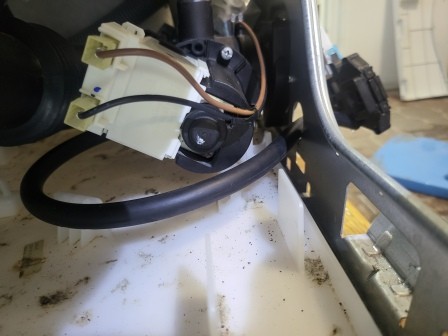
Pic 11 Pump testing After reassembly, it is common for the wire terminal connection to the pump connector pin to be faulty; functionally, this acts like an open circuit, but in reality, you simply need to reconnect the wires to the pump terminals. Pump is burnt out ~0 Ohms Short circuit Normal resistance Pump might still be alive → continue troubleshooting Step 3: Check the Wiring A very common cause Check: • the connector on the pump (corrosion, loose contact) — this is exactly what we described above • the wires leading to the control board Common with LG: the wire breaks right at the base Step 4: Check the Control Board If: • there is no 120V supply reaching the pump • the wiring is intact then the only remaining culprit is: the pump relay on the control board Quick Test Without a Multimeter (for a simpler approach) Apply 120V directly to the pump (be careful!) If: • it spins → the problem lies with the control board • it doesn't spin → the pump is dead Regarding Your Specific Case (Very Important) You mentioned: "it doesn't hum, it makes no noise" this almost always indicates: #1 Cause: no power reaching the pump #2 Cause: a defective new pump (open circuit) My Diagnosis (Based on LG Experience) 70% — The pump is dead (even if it's new) 20% — Connector / Wire issue 10% — Control board issue Problem #3 The wash cycle has finished. The water drained normally. The drying cycle ran. However, the display now shows "Cd" and the door remains locked. Why? Great! That's a completely different story—and here's the good news: you do NOT have a malfunction! What "Cd" Means on the LG WM3455HM Cd = Cool Down (cooling phase after drying) This is a normal, standard operating mode. What's Happening Inside After the drying cycle: • The drum is extremely hot. • The interior is filled with hot air and steam. The machine initiates: • Drum rotation. • Ventilation. • A gradual cooling process. Why the Door Is Locked This is a safety measure: • To prevent you from getting burned. • To prevent the sudden release of hot steam. Therefore: The door remains locked UNTIL the "Cd" indicator disappears. How Long It Lasts Typically: • 10–30 minutes. • Sometimes longer, if the drying cycle was particularly long. Normal Signs • The drum rotates intermittently. • You may hear a faint ventilation noise. • The water has already drained (as is the case with your unit—this is important ). When It Is NOT Normal If: • The "Cd" indicator persists for more than 1 hour. • There is absolutely no movement or activity. • The door remains locked for a long time even after the cooling process is complete. In that case, the issue likely lies with: • The temperature sensor. • Or the control board. IMPORTANT (Connection to your previous "OE" issue) You previously mentioned the "OE" error → indicating a pump issue. Now: • The water is draining normally . • The drying function is working . • The "Cd" indicator is appearing . This means: The machine is, overall, in good working order. What to Do Now Simply wait. The "Cd" indicator will disappear on its own. The door will unlock automatically. Summary • "Cd" is not an error code. • It is a normal cooling mode. • The door lock is a standard safety feature. IMPORTANT SAFETY NOTICE & DISCLAIMER WARNING
ELECTRICAL
HAZARD The information provided on this website is for educational and general diagnostic purposes only. WARNING: Performing electrical work carries inherent risks of severe injury, electrocution, or property damage. Before inspecting or troubleshooting any electrical appliance, you must read the manufacturer's instruction manual (specifically the troubleshooting section) and completely disconnect the device from the power source by unplugging it from the electrical outlet. Simply turning the device off using its power switch is NOT sufficient to eliminate electrical hazards. Under Florida law (Chapter 489, Florida Statutes), property owners are generally permitted to perform basic inspection and diagnostic tasks on their own property. However, electrical installations, alterations, or complex repairs must be performed exclusively by a licensed and certified electrical contractor. Do not attempt complex repairs yourself. |



|